

Off-the-shelf software promises a lot. In practice, it often forces your business to work around its limitations rather than the other way around. You end up paying for features you never use, missing ones you desperately need, and spending hours on manual workarounds that should be automated. For small and medium-sized businesses across the UK, this is a genuine drain on time and money. This guide walks you through how to plan, build, and verify a custom web app that actually fits your business, so you can stop bending your processes to match your software and start using tools that work the way you do.
Table of Contents
- Understanding your business needs and goals
- Preparing for development: Planning, tools, and team
- Step-by-step guide to building your custom web app
- Testing, optimisation, and avoiding common mistakes
- What most guides miss about custom web app success
- Get expert help for your business's custom web apps
- Frequently asked questions
Key Takeaways
| Point | Details |
|---|---|
| Start with clear goals | Define your business’s pain points and objectives before planning your custom web app. |
| Choose the right approach | Select appropriate tools, frameworks, and expertise based on your project’s requirements and budget. |
| Prioritise user testing | Test your web app with real users to ensure usability and catch potential issues before launch. |
| Plan for ongoing updates | Continuous feedback and regular improvements are key to long-term app success. |
Understanding your business needs and goals
Having set the stage for why custom solutions matter, it's crucial to begin with precise goal-setting. Before you write a single line of code or brief a developer, you need to be honest about what problem you're actually trying to solve.
This sounds obvious, but many businesses jump straight to "we need an app" without clearly defining what that app should do differently from what they have now. The result is a build that costs money, takes time, and still doesn't fix the core issue.
Start by listing the processes in your business that feel slow, error-prone, or frustrating. Common candidates include:
- Invoice generation and chasing — manually creating invoices in spreadsheets and tracking payment status by email
- Booking and appointment management — using a generic calendar tool that doesn't connect to your billing or client records
- Stock and inventory tracking — relying on spreadsheets that get out of date the moment someone forgets to update them
- Staff scheduling and timesheets — managing shifts through group chats or paper forms
- Client onboarding — sending the same documents and forms manually every time a new customer signs up
- Internal reporting — pulling data from multiple systems to produce a weekly or monthly report
Once you've listed the pain points, ask yourself these questions for each one: Where do errors or rework most commonly occur? How much time does this process take per week? What would a 50% improvement in this area mean for the business in real terms?
The answers give you a priority list. Not everything needs to be in version one of your app. In fact, the most successful custom builds start focused and expand over time.
It's also worth looking at real-world web app examples that serve businesses similar to yours. Seeing how other professional services firms, such as accounting practices, law firms, or consultancies, have used custom tools helps you identify what's genuinely possible and what a well-scoped project looks like in practice.
Pro Tip: Don't just ask the business owner what needs fixing. Talk to the people who actually use the processes day to day. A receptionist, warehouse operative, or account manager will often identify inefficiencies that management doesn't even know exist. Involving stakeholders from across your team gives you a far more complete picture of what the app needs to do.
Preparing for development: Planning, tools, and team
Clear goals inform the foundation of your planning and selection process. Once you know what you're building and why, you need to make decisions about how you'll build it and who will do the work.

One of the first decisions is which technology to use. This doesn't need to be a deeply technical conversation, but it's worth understanding the landscape so you can have an informed discussion with any developer you work with.
| Framework or tool | Best suited for | Typical SME use case |
|---|---|---|
| Laravel (PHP) | Custom back-end logic, secure data handling | Booking systems, client portals, internal dashboards |
| Django (Python) | Data-heavy apps, rapid prototyping | Reporting tools, inventory management, survey platforms |
| React / Next.js | Fast, interactive front-ends | Customer-facing portals, real-time dashboards |
| WordPress (with custom plugins) | Content-led sites with some app functionality | Simple booking forms, membership areas |
| Low-code platforms (e.g. Bubble, Webflow) | Quick prototypes, limited customisation | MVP testing, simple internal tools |
The right choice depends on your specific requirements, your budget, and how much flexibility you'll need as the app evolves. A good developer will guide you here, but understanding the basics means you won't be making decisions entirely in the dark.
Next, decide who will build it. Your options broadly fall into three categories:
- Freelance developer — more personal, often faster to communicate with, lower overheads, and better suited to focused SME projects
- Digital agency — larger teams, more resource, but higher costs and sometimes less direct communication
- In-house developer — full control, but significant ongoing salary cost and harder to justify for a single project
For most small businesses, a skilled freelance developer with a track record in business-critical applications is the most practical and cost-effective route. Explore different web app planning approaches to understand how experienced developers structure projects before you commit to anyone.
Before any coding begins, make sure you have the following project deliverables agreed and documented:
- A written scope of work covering all features and functionality
- Wireframes or rough sketches of the key screens and user journeys
- Agreed data structure and any third-party integrations required
- A realistic timeline with milestones
- Clear ownership of testing and sign-off at each stage
Pro Tip: Budget for more than just the build. Ongoing hosting, security updates, and future feature additions are all real costs. A well-built app that's never maintained will eventually become a liability. Build support costs into your planning from day one, not as an afterthought.
Step-by-step guide to building your custom web app
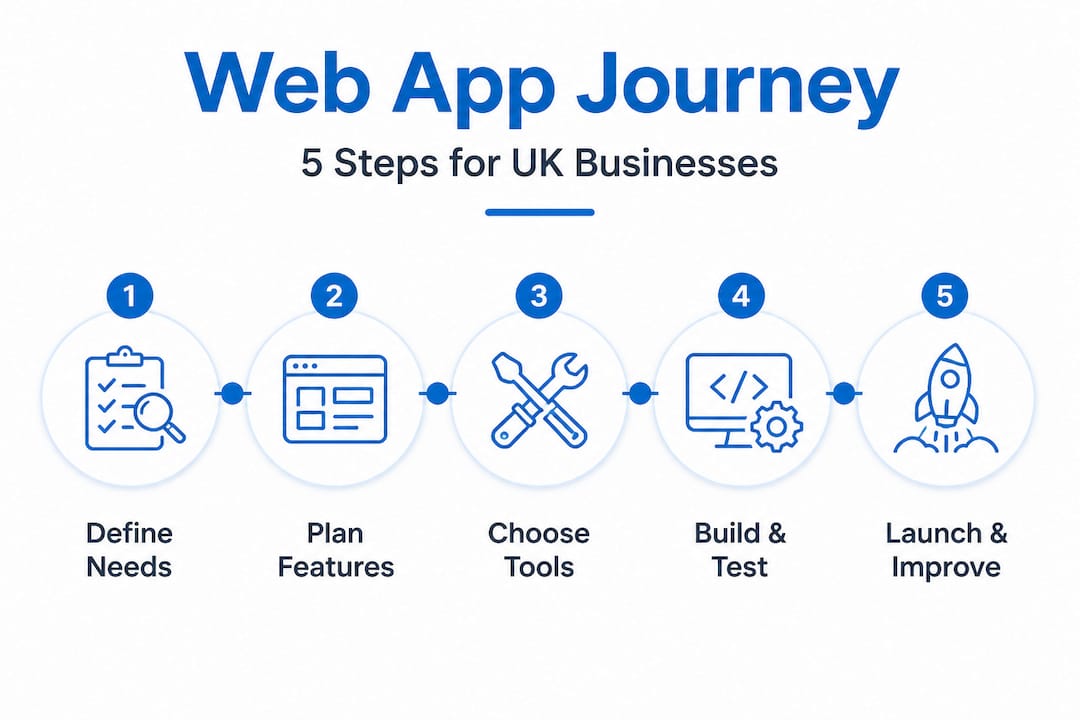
With your plan and resources in place, you're ready to move on to the build process itself. Here's a clear walkthrough of each phase, written for business owners rather than developers.
-
Prototyping — Create low-fidelity sketches or clickable wireframes of the app's key screens. This isn't about making it look good; it's about agreeing on what exists and where. Tools like Figma or even paper sketches work at this stage. The goal is to spot gaps before development starts.
-
UX and UI design — Once the structure is agreed, a designer (or your developer, if they have design skills) creates the visual layout. This includes colour schemes, typography, button placement, and how users move through the app. Good UX design reduces training time and user errors significantly.
-
Development — The actual build. This is where your developer writes the code, sets up the database, and connects any third-party tools like payment processors, email services, or accounting software. Expect regular check-ins and progress updates at this stage.
-
Testing — Before launch, the app needs to be tested thoroughly. This includes functional testing (does everything work as expected?), security testing (is data protected?), and user testing (can real people actually use it without confusion?).
-
Deployment — The app goes live on your chosen hosting environment. A good developer will handle this carefully, ensuring there's no data loss, no downtime, and a clear rollback plan if something unexpected happens.
"Always test your app with real users before full public launch. What seems intuitive to a developer often isn't to someone using it for the first time under real work pressure."
Here's a quick comparison to help you decide which route suits your situation:
| Option | Cost | Flexibility | Time to launch | Scalability |
|---|---|---|---|---|
| Custom build | Higher upfront | Very high | Weeks to months | Excellent |
| Off-the-shelf software | Lower upfront | Low | Immediate | Limited |
| Low-code platform | Medium | Medium | Days to weeks | Moderate |
Data security is a responsibility you cannot ignore. If your app handles personal data, you have obligations under UK GDPR. This means data must be stored securely, access must be controlled, and users must be informed about how their data is used. Ensure your developer builds security in at the data layer, not as a last-minute addition. You can explore custom app build insights that include examples of how security is handled in real business applications.
Testing, optimisation, and avoiding common mistakes
Now that the app is built, it's critical to make sure it works flawlessly for your team and clients. Testing is not a single event; it's an ongoing process, and many SME projects underestimate how much time and attention it deserves.
Use this checklist before you consider the app ready for launch:
- Security testing — Check for common vulnerabilities such as SQL injection, unauthorised access, and unencrypted data storage
- Usability testing — Have real staff members (not the developer) complete key tasks and observe where they struggle
- Speed and performance — Test load times on both desktop and mobile, particularly if the app will be used on smartphones or tablets in the field
- Mobile responsiveness — Verify the app displays and functions correctly on a range of screen sizes
- Data accuracy — Run test data through every process and confirm the outputs are correct
- Browser compatibility — Test across Chrome, Firefox, Safari, and Edge to catch any display issues
- Backup and recovery — Confirm that data is backed up regularly and that you can restore it if something goes wrong
Common mistakes businesses make at launch include skipping user training (assuming the app is "self-explanatory"), failing to communicate the change to staff in advance, and not having a clear plan for what to do if the app goes down during a busy period.
Another frequent error is treating launch day as the end of the project. It isn't. It's the beginning of the real-world phase, where actual use reveals things that testing never could.
For web app testing and optimisation, the most effective approach is to schedule a structured review at 30 days and 90 days post-launch. Collect feedback from staff and clients, identify what's working and what isn't, and prioritise improvements accordingly.
Pro Tip: Set up a simple feedback channel from day one. A short form, a shared document, or even a dedicated email address gives your team a place to log issues and suggestions. You'll collect far more useful information than you would from occasional conversations.
What most guides miss about custom web app success
Most articles focus heavily on the build and the launch. They treat the go-live date as the destination. In reality, it's more like the end of the runway. That's where the flight actually begins.
The businesses that get the most value from custom web apps are not the ones with the most polished version one. They're the ones that treat the app as a living tool, something that evolves as the business evolves. A feature that seemed essential during planning might turn out to be rarely used. A process you didn't think to automate might become the most valuable addition six months in.
Here's the honest truth: no amount of planning fully prepares you for how real users interact with a system under real conditions. Staff will find shortcuts you didn't anticipate. Clients will misunderstand flows that seemed perfectly logical on paper. Edge cases will appear that weren't in the original scope.
This isn't a failure of planning. It's just how software works in the real world. The question is whether you're set up to respond to it.
Small businesses have a genuine advantage here. Unlike large enterprises, you don't need three approval layers and a change management committee to update a feature. You can identify a problem on Monday and have it fixed by Thursday. That agility is genuinely valuable, and it's something large organisations spend enormous effort trying to replicate.
Be open to feedback from your staff and clients after launch, even when it's uncomfortable. The person who tells you the app is confusing is doing you a favour. The custom app development perspective that delivers long-term ROI is one built on continuous improvement, not a single perfect release.
Get expert help for your business's custom web apps
Ready to bring your vision to life, or need an expert to guide you further? Building a custom web app is one of the most impactful investments a small business can make, but only if it's done properly. A poorly scoped or poorly built app can cost more to fix than it would have to build correctly from the start.
At Livett Web Designs, we work directly with small and medium-sized businesses across Harlow, Essex, and the wider UK to build practical, secure, and scalable web applications. From digital logbooks and ticket systems to inventory management tools and client portals, every project is built to fit your specific processes, not the other way around. There are no templates, no agency overheads, and no guesswork. You speak directly with the developer throughout. If you're ready to explore what a custom solution could look like for your business, visit Livett Web Designs custom solutions to get started.
Frequently asked questions
How long does it take to build a custom web app for a small business?
Most simple business web apps take from a few weeks up to three months to go from planning to launch, depending on features and complexity. More involved projects with integrations or complex data logic may take longer, as outlined in real project timelines.
Do I need to hire a developer, or can I use no-code tools?
No-code tools are suitable for simple apps, but for full customisation and scalability, hiring a developer is the better long-term choice. They give you control over your data, your logic, and your future feature roadmap in ways that no-code platforms simply cannot match.
How much will it cost to build a custom web app?
Costs vary widely depending on scope and complexity; small business apps typically start from several thousand pounds, with additional investment for ongoing support and updates. Getting a clear written quote upfront, as offered through transparent pricing, helps you plan accurately.
What support will I need after launch?
Expect to need regular updates, security patches, and occasional new features to keep the app running smoothly and securely. Factoring in a support arrangement from the start prevents costly gaps in coverage down the line.